Product Description
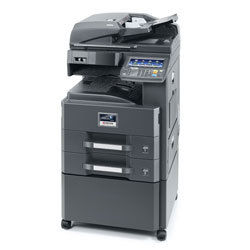
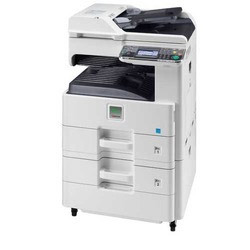
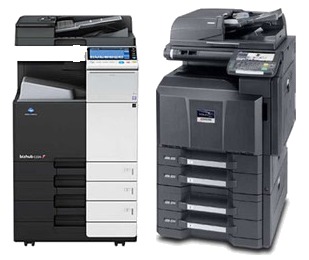
Kyocera Taskalfa 3010i Digital Copier Machine
- 30 A4 pages per Minute
- 2 GB RAM + 160 GB HDD memory and storage
- Standard network and mobile printing as well as colour scanning
- Standard Duplex (Auto two side copying)
- Optional DADF
- inner job Separator as standard.
- First copy time in just 3.6 seconds
- Long-life components provide unprecedented efficiency and reliability
- Low Power Consumption: 620w
- Creating a Mobile Workforce with Mobile & Cloud Solutions
- Drum Life Up to 6 Lakh Copies*
Advanced Office FunctionalityThe Kyocera Taskalfa 3010i delivers powerful digital copying and printing with a high-performance laser electrophotographic process. Its 30 pages per minute print speed, 256-level grayscale, and 600 x 600 dpi resolution meet the demands of busy offices while maintaining exceptional quality. Users benefit from features like ID Card Copy, Electronic Sort, and a responsive touch screen display.
Flexible Connectivity and Paper HandlingOffering USB 2.0, Gigabit Ethernet, and optional wireless support, this machine easily integrates with different networks and platforms. With a standard input capacity of 1,100 sheets, an output tray for 250 sheets, and support for multiple paper sizesfrom A3 to customusers experience uninterrupted operation and efficient document handling in any office setting.
Reliable and User-Friendly DesignKyoceras ergonomic 594 x 695 x 748 mm design, coupled with a quick warm-up time of under 23 seconds and simple user interface, enhances workplace productivity. Its large toner yield, expandable memory, and automatic duplex printing all contribute to reduced downtime, making this copier an excellent long-term investment.
FAQs of Kyocera Taskalfa 3010i Digital Copier Machine:
Q: How do I operate the Kyocera Taskalfa 3010i for duplex printing?
A: Duplex printing is a standard feature with the Taskalfa 3010i. Simply select the duplex option from the print settings on your computer or directly from the 8.5-inch touch screen panel. The machine will automatically print on both sides of the paper without manual intervention.
Q: What is the process for expanding the memory on this copier?
A: The Taskalfa 3010i comes with 2 GB of RAM as standard. To expand the memory, contact your supplier or authorized service provider in India for compatible memory modules and professional installation, ensuring optimal performance for large or complex tasks.
Q: When should I replace the toner on the Taskalfa 3010i?
A: The toner should be replaced when the machine notifies you, typically after printing approximately 20,000 pages at 6% coverage. Follow the on-screen prompts for toner replacement and use only genuine Kyocera toner for best results.
Q: Where can I connect the Taskalfa 3010i within my office network?
A: You can connect this copier using its USB 2.0 interface for direct connections or via Ethernet (10/100/1000Base-T) for networked environments. For wireless connectivity, install the optional adapter and follow the setup instructions.
Q: What operating systems are compatible with the Taskalfa 3010i?
A: This copier supports Windows, Mac OS, and Linux operating systems. Ensure you download the appropriate drivers from Kyoceras website to guarantee smooth operation and feature access.
Q: How can I benefit from the machines ID Card Copy and Job Build functions?
A: ID Card Copy allows you to scan both sides of an ID onto a single page, saving time and paper. Job Build enables combining multiple copy jobs into a single task, which is especially beneficial when working with large sets of documents.
Q: What maintenance is required for optimum performance?
A: Routine tasks include replenishing paper and toner, and periodic cleaning of the scanner glass and interior. For in-depth maintenance, refer to the user manual or schedule regular servicing with an authorized Kyocera service provider in India.









 Send Inquiry
