Product Description
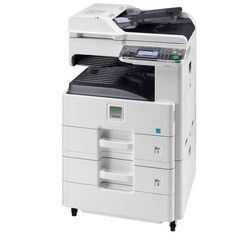
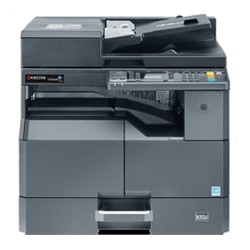
We are engaged in offering highly operational Kyocera FS 6030 that is ideal to print, copy, color scan and fax functions. These copiers are designed and manufactured by utilizing superlative quality components and modern methodology at our vendors' end. Designed for connection with almost any make of computer, the offered Kyocera FS 6030 is made available for clients at pocket friendly price.
Features :
- 30 Copies per minute (FS6030)
- Low Power Consumption (600W)
- Time to first copy: 9.2 seconds or less
- Professional print, copy, colour scan and fax functionality
- Paper capacity 550 papers x 2
- Easy to install and operate
- Easy to use wizard style navigation
- Low noise emissions match desktop printers
- Compact, 360o all round stylish design to match any office
- Long-life components provide unprecedented efficiency and reliability
- Low printing costs in its class
Fast and Efficient PerformanceThe Taskalfa FS6030 delivers up to 30 pages per minute and a first copy output as quick as 4.9 seconds. Its sizeable monthly duty cycle of up to 100,000 pages is designed to handle intensive workloads reliably, making it ideal for busy office settings that demand performance alongside consistency.
Flexible Paper HandlingWith a standard input capacity of 500 sheets (expandable to 2,100 sheets), the FS6030 accommodates everything from A5R to A3 paper sizes. It supports a variety of paper weights through both standard and multi-purpose trays, ensuring flexibility for diverse business needs and specialty printing tasks.
User-Friendly and Environmentally ConsciousFeaturing an intuitive LCD display and standard automatic duplexing, the FS6030 streamlines workflow while reducing paper consumption. Energy Star qualification underscores its commitment to energy efficiency, supporting business sustainability initiatives alongside high productivity.
FAQs of Kyocera Taskalfa FS6030 Digital Copier:
Q: How do I set up the Kyocera Taskalfa FS6030 Digital Copier for network printing?
A: To set up the copier for network printing, connect it to your LAN using the Ethernet interface. Install the provided drivers for Windows or Mac OS on your workstation. Once connected, you can configure the printer via the devices LCD panel or your computer to enable network sharing.
Q: What paper sizes and types can the FS6030 handle?
A: The copier supports paper sizes from A5R up to A3, with standard trays holding 6090 gsm and the multi-purpose tray accommodating paper weights from 60163 gsm. It is suitable for various office printing needs, including standard documents, booklets, and specialty media.
Q: When should I upgrade the copiers memory, and how much additional memory can it support?
A: If you frequently process large or complex print jobs, upgrading the memory is beneficial for maintaining speed and reliability. The base configuration includes 256 MB RAM, and additional memory modules can be installed to enhance multitasking and performance.
Q: Where can I source compatible toner cartridges for the FS6030?
A: The Taskalfa FS6030 uses the Kyocera TK-670 toner cartridge. You can obtain genuine or compatible cartridges through authorized distributors, suppliers, or service providers across India, ensuring consistent print quality and device reliability.
Q: What is the process for duplex (double-sided) printing on this copier?
A: Automatic duplex printing is enabled by default. To copy or print on both sides, simply select the duplex option on the LCD panel or within your print settings dialogue on your computer. The device will handle double-sided printing automatically, reducing paper usage.
Q: How does the FS6030 benefit businesses or service providers?
A: The copiers high engine speed, large input capacity, low warm-up time, and robust duty cycle streamline office operations. Its support for high-volume tasks, energy-efficient design, and user-friendly interface help businesses enhance productivity while minimizing operational costs.









 Send Inquiry