Product Description
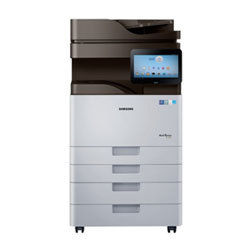
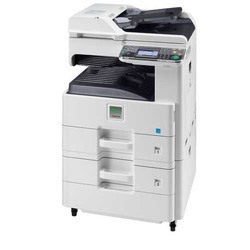
Samsung Smart MultiXpress K4300LX Digital Copier Machine
Features : - Engine speed : 30 PPM
- A3 Network Printer : Yes
- A3 Colour Scanner : Yes
- Duplex : Yes (Auto two side printing)
- R.A.D.F (100 Papers) : Yes
- Prints from Pen drive : Yes (without Computer)
- Scan to : Pendrive, email, Folder & HDD
- Scan Once print many : Yes
- Zoom : 25% - 400%
- Mobile Print : Yes
- Processor : 1 GHz
- RAM : 2 GB DDR3 Memory
- Operational Panel : 10.1" Colour Touch Screen
- Warm-up time : Recovery from sleep 20 sec or less
- First copy out time : 5.5 sec approx
- Continues Copies : 1- 9,999
- Copy & Print sizes : A4 / LGL / A3
- Control penal : Colour Touch screen display (4.3)
- Paper supply : Dual cassettes (520x2)
- Multi Function Tray : Yes (100 papers)
- Power consumption : 1.3Kw (Best in class)
- Print Quality (Resolution) : 1200x1200 DPI
- Number of copies : 25,000 Copies* Per Cartridge
- Drum life : Two Lakhs Copies*
Intelligent PerformancePowered by a Dual Core 1 GHz processor and equipped with 2 GB RAM, the K4300LX manages demanding office tasks efficiently. Its 320 GB hard drive provides ample storage, enhancing workflow and security.
Advanced UsabilityThe customizable 10.1-inch color touchscreen, built on Android OS, offers seamless navigation and personalizable settings. This smart interface simplifies tasks, making the copier highly user-friendly for all team members.
High Capacity & SpeedDesigned for productivity, this copier supports up to 2,180 sheets and prints up to 30 ppm (A4). Thanks to automatic duplexing and rapid warm-up, it saves time while delivering professional-grade output every time.
FAQs of Samsung Smart MultiXpress K4300LX Digital Copier:
Q: How do I connect the MultiXpress K4300LX to my office network?
A: You can connect the copier via Ethernet or USB 2.0. Simply plug the device into your preferred port and follow the on-screen setup instructions for seamless integration with Windows, Mac OS, or Linux systems.
Q: What operating systems are supported by this digital copier?
A: The Samsung K4300LX is compatible with Windows, Mac OS, and Linux, ensuring versatile usability across various platforms in the workplace.
Q: When is the optimal time to use the MultiXpress K4300LX for high-volume printing?
A: This copier is designed to handle heavy workloads, with a monthly duty cycle up to 120,000 pages. Its optimal for continuous or batch printing in busy environments, thanks to its high input capacity and print speed.
Q: Where can I find service support or authorized dealers for this copier in India?
A: Authorized distributors, importers, manufacturers, service providers, suppliers, and traders for this model are available throughout India. Please refer to Samsungs official website or local directories for locations and contacts.
Q: What is the process for switching between single-sided and duplex printing?
A: The MultiXpress K4300LX offers automatic duplex printing as a standard feature. Through the touchscreen UI, select the desired printing mode before initiating the print job. Duplexing reduces paper usage and streamlines workflows.
Q: How does the customizable Android-based operating panel benefit users?
A: The customizable panel offers an intuitive experience, allowing users to personalize workflows and shortcuts for frequently used tasks, which enhances efficiency and minimizes training time.
Q: What are the main advantages of using the MultiXpress K4300LX for office document handling?
A: Key advantages include rapid print and copy speeds, high resolution output, large paper capacity, automatic double-sided printing, versatile OS compatibility, and robust data storage for secure, efficient document management.









 Send Inquiry
