Product Description
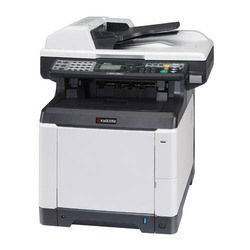
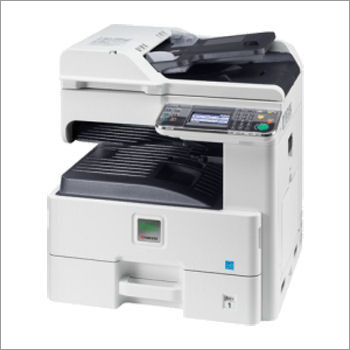
Kyocera FS-C2126 LGL Colour MFP Copier Machine
Kyocera FS-C2126 LGL Colour MFP Copier Machine can print and copy at a fast 26 pages/minute while delivering a true out-of-the-box solution, including standard network printing, copying, colour scanning and fax functionality.
Suited for work groups demanding luscious colour output with first-class productivity and outstanding features - all at a low cost per page. Efficiency and reliability combine with a large number of standard functionality to make this Colour MFP perfect for your work group.
Standard Specifications :
- A4 / LGL MFP: Print / Copy / Scan / Fax device with print speed of 26ppm A4 / LGL Colour
- Monochrome, with standard duplex and network interface
- Boasts an incredible 200,000 page Drum Life
Versatile Colour Multifunction PerformanceThe Kyocera FS-C2126 LGL Colour MFP Copier meets diverse workplace demands by combining printing, copying, and scanning functions. Its laser color technology delivers sharp, vivid documents for both mono and color output. With a sturdy input capacity and automatic duplexing, it easily handles large batch tasks, maximizing productivity in fast-paced office settings.
Efficient Office Integration and ConnectivityDesigned for seamless network operations, this copier supports both USB 2.0 and Ethernet connections. Its compatibility with Windows, Mac OS, and Linux ensures straightforward integration into existing systems. The control panel facilitates quick navigation, and the optional fax function expands communication capabilities for organizations of all sizes.
Economical Operation and Reliable PerformanceFeaturing low power consumption in sleep mode and reduced noise levels during printing, the Kyocera FS-C2126 LGL is environmentally conscious while delivering consistent performance. High input and output capacities ensure smooth workflow, while the robust monthly duty cycle supports sustained heavy usage with minimal maintenance.
FAQs of Kyocera FS-C2126 LGL Colour MFP Copier Machine:
Q: How does automatic duplex function benefit daily office tasks?
A: The standard automatic duplex feature allows printing on both sides of the paper without manual intervention. This not only speeds up document production but also reduces paper usage, making your printing operations more eco-friendly and cost-effective.
Q: What types of paper sizes and weights can the Kyocera FS-C2126 handle?
A: This copier supports a variety of paper sizes including A4, Legal, Letter, Folio, A5, A6, B5, Executive, and Statement. It accommodates paper weights ranging from 60 to 220 g/m, providing flexibility for multiple printing needs from standard documents to thicker media.
Q: When should I consider expanding the memory of the copier?
A: Expanding the memory from the standard 512 MB RAM to 1024 MB is recommended when dealing with large print jobs, complex graphics, or heavy network workloads. Enhanced memory capacity improves print processing speeds and overall device responsiveness.
Q: Where can the Kyocera FS-C2126 Copier be used effectively?
A: This model is suited for offices, organizations, schools, and businesses requiring reliable multifunction use, especially where high monthly print volume and flexible media support are needed. It is widely distributed, serviced, and supported across India by authorized partners.
Q: What is the process for connecting the copier to a network?
A: To connect the copier, simply use the standard Ethernet 10/100Base-TX port for wired networking or USB 2.0 for direct attachment to a computer. Follow the setup instructions on the 5-line LCD display to configure network settings, ensuring smooth integration and access for multiple users.
Q: Which operating systems are compatible with the Kyocera FS-C2126?
A: This device is compatible with Windows, Mac OS, and Linux operating systems, making it suitable for most office environments. Its universal drivers help ensure stable operation and ease of use across a variety of networked systems.
Q: What are the main advantages of using this colour MFP copier in business?
A: Businesses benefit from its fast print and copy speeds, excellent color reproduction, robust network features, versatile media support, and energy-saving operation. These qualities foster greater efficiency and professionalism in document handling.









 Send Inquiry
