Product Description
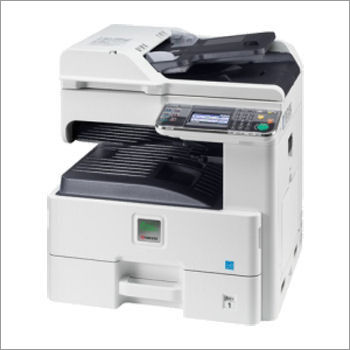
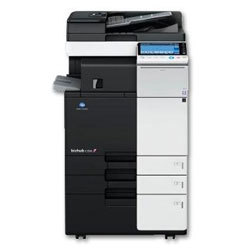
Keeping in mind the wide requirements of small offices, we bring forth highly functional Kyocera FS-C8520 A3 Colour MFP. Provided machine offers all the benefits of a multifunctional printer such as print, copy and scan for A3 size sheets. Easy to operate, touchscreen, high speed and various paper-handling options feature this machine as a hybrid platform for advanced solutions. Sourced from the authentic vendors of the market, we offer this Kyocera FS C8520 A3 Color Mfp at marginal prices to the clients.
Features:
Specifications :
-
20 pages per minute in colour and b/w
-
A3 Print / A3 Copy / A3 Scaning
-
Standard Duplex
-
Color Network Printing & Scaning
-
Colour Touch screen Display
-
Prints from Pendrive
-
Scan to Pendrive / Folder / Email
-
Up to 250 GSM paper support
-
Time to first copy: 15.6 seconds or less
-
High resolution colour print quality
-
Professional print, copy, scan, functionality
-
Up to 1,600 sheets paper capacity
-
Easy to install and operate
-
Easy-to-use wizard-style navigation
-
Low Power Consumption (Beast in class)
-
Low noise emissions match desktop printers
-
360o all-round stylish design
-
Long-life components provide unprecedented efficiency and reliability
-
Exceptionally low printing costs in its class
Advanced Multipurpose PrintingExperience seamless multifunctionality with the Kyocera FS C8520. Designed for efficient document management, this device offers vibrant colour printing, crisp copying, and high-resolution scanning. Its 20 ppm speed and reliable duplex printing maximize office productivity while reducing paper usage. Perfect for environments that demand both quality and versatility, this A3 Colour MFP supports a range of paper sizes and weights, catering to diverse document needs.
User-Friendly Control and OperationOperating the FS C8520 is straightforward thanks to its tiltable LCD control panel. The intuitive interface streamlines copying, scanning, and printing tasks, making it accessible for users of all skill levels. With a quick warm-up time of approximately 32 seconds and a first copy out time of 11 seconds (mono), efficiency is built in. Low noise levels help maintain a focused workspace, even during peak usage.
Durable Build and Flexible ConnectivityBuilt to withstand heavy workloads, this device features a PowerPC 464 1 GHz processor, robust memory, and support for up to 100,000 pages per month. Its compatibility with Windows, Mac OS, and Linux ensures easy integration within varied network environments. The FS C8520 is a reliable choice for businesses in India, backed by distributors, suppliers, and service providers throughout the region.
FAQs of Kyocera FS C8520 A3 Color Mfp:
Q: How do I set up duplex printing on the Kyocera FS C8520 A3 Color MFP?
A: Duplex printing is enabled as a standard feature on the FS C8520. To set it up, access the printer settings via the tiltable LCD control panel or your computers print dialog. Select the double-sided or duplex option before printing to automatically print on both sides of the paper, saving resources and reducing paper usage.
Q: What types and sizes of paper can the Kyocera FS C8520 handle?
A: This MFP supports a variety of media sizes including A3, A4, A5, B4, B5, Letter, Legal, Folio, and several custom sizes. The device accommodates paper weights ranging from 60 to 163 g/m, making it adaptable for diverse document types and office requirements.
Q: When should I upgrade the memory, and what benefits will it provide?
A: Consider upgrading the memory from 1024 MB to the maximum 2048 MB if your workflows involve processing large documents, complex graphics, or frequent multi-tasking. Increased memory allows for smoother performance, faster job processing, and improved handling of demanding print or scan tasks.
Q: Where can I find support or service for the Kyocera FS C8520 in India?
A: You can access support, servicing, and genuine product supplies from authorized Kyocera distributors, importers, manufacturers, service providers, suppliers, and traders throughout India. Contact your local Kyocera representative or visit the official website for assistance and warranty information.
Q: What is the process for copying documents with zoom adjustment on this MFP?
A: To copy with zoom adjustment, place your document on the scanner. From the LCD control panel, select Copy, then enter the desired zoom percentage, which ranges from 25% to 400% in 1% increments. After setting your preferences, start the copy job for precisely scaled output.
Q: How quiet is the FS C8520 during operation, and why does this matter?
A: The FS C8520 operates at noise levels below 49 dB(A) while printing. This low noise output ensures a quieter office environment, reducing distractions and helping maintain workplace concentration during high-volume print jobs.
Q: What are the primary advantages of using the FS C8520 for businesses?
A: The principal benefits include versatile media handling, reliable duplex printing, consistent high-quality colour output, compatibility with multiple operating systems, robust monthly duty cycles, and easy operation via the user-friendly LCD panel. These features help businesses increase productivity while minimizing costs and downtime.









 Send Inquiry
