Product Description
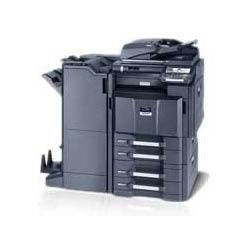
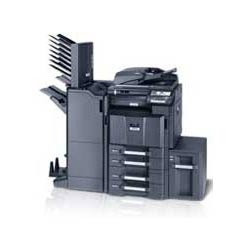
Kyocera Taskalfa 3550Ci Colour Copier Machine
IMAGE BUSINESS MACHINES is one of the renowned importers, suppliers, distributors, traders and wholesalers of a wide range of Kyocera Taskalfa 3550Ci Colour Copier. These devices are sourced from the certified manufacturers who engineer these as per international industrial standards and ensure high productivity and excellent printing quality. These ensure optional high-speed and large-capacity one-path duplex scanning which make these one of the most preferred selections of clients. Our clients can avail these at market leading rates.
Features :
- 35 Prints per minute
- Standard 2 GB ram + 160 gb hdd memory storage
- Heavy duty copier with printer
- Optional high-speed and large-capacity one-path duplex scanning
- Wide range of media up to 300gsm, a3-wide, 12x18 and banner printing
- Max. 6 media types of paper handling, finishing options with booklet and tri-folding
- Up to 35 pages per minute a4 in colour and monochrome
- Advanced colour technology for excellent quality
- Long-life components provide unprecedented efficiency and reliability
High-Volume Productivity for Busy OfficesDesigned for efficiency, the Kyocera Taskalfa 3550Ci handles demanding print and copy jobs with ease. The 2 GB RAM and 160 GB HDD ensure smooth multitasking, while the automatic duplex feature streamlines two-sided printing to save paper and time. With a monthly duty cycle of up to 150,000 pages, this machine supports the productivity needs of enterprises and large offices alike.
Advanced Scanning and Document HandlingEquipped with a standard dual scan document processor, the Kyocera Taskalfa 3550Ci quickly digitizes large batches of documents. Scanning at up to 600 x 600 dpi with a 24-bit colour depth, it delivers sharp and accurate digital copies. The versatile document feeder and broad range of supported paper weights and sizes empower users to process various original documents efficiently.
Flexible Connectivity and Platform SupportSeamless integration into any workspace is possible with USB 2.0 and Ethernet connectivity options, plus optional wireless networking. The copier is compatible with major operating systems like Windows, Mac OS, and Linux. Comprehensive network protocol support ensures smooth deployment within existing IT infrastructures, whether for direct office use or larger corporate networks.
FAQs of Kyocera Taskalfa 3550Ci Colour Copier Machine:
Q: How do I operate the Kyocera Taskalfa 3550Ci for copying and scanning tasks?
A: The Taskalfa 3550Ci features an easy-to-navigate touchscreen LCD panel, allowing users to access copy, scan, and print functions directly. For multi-page documents, simply load originals into the dual scan document processor and select your desired settings on the display.
Q: What are the main benefits of choosing the Kyocera Taskalfa 3550Ci for my business?
A: This machine is built for durability and high monthly usage, offering robust print speeds, sharp colour and mono reproduction, and reliable duplex printing. Its advanced memory and storage, combined with flexible connectivity, make it ideal for handling complex, high-volume workflows efficiently.
Q: When should the Kyocera Taskalfa 3550Cis maintenance be performed?
A: Routine maintenance should follow the manufacturers recommended schedule, particularly after large print volumes. Regular cleaning and timely replacement of consumables help maintain optimal performance and minimize downtime.
Q: Where can I use the Kyocera Taskalfa 3550Ci?
A: This copier is well-suited for office environments, print rooms, educational institutions, and businesses needing versatile document handling. Its compact footprint and network integration capabilities ensure it fits seamlessly into various professional settings.
Q: What operating systems and network protocols are supported by this copier?
A: The Kyocera Taskalfa 3550Ci supports major operating systems, including Windows, Mac OS, and Linux. It is compatible with multiple network protocols such as TCP/IP, IPX/SPX, AppleTalk, and NetBEUI, making it adaptable for different IT infrastructures.
Q: How does the duplex printing process work on this machine?
A: Standard automatic duplex printing is built in, enabling the copier to print on both sides of the paper without manual intervention. Simply select the duplex option from the print settings to save paper and reduce waste effectively.









 Send Inquiry
